
Food Cost & Menu Pricing Template
Excel (.xlsx) — also opens in Google Sheets & Numbers
A food cost template is a spreadsheet that works out what each dish costs to make and what you need to charge for it. This one does it for a whole menu in Excel or Google Sheets: a Dish Cost sheet turns pack prices into cost per portion, food cost %, GP and a suggested price ex-VAT, and a Menu Overview tab flags every dish whose food cost has drifted too high.
What's inside
- Auto cost-per-portion, food cost % and GP% with live formulas
- Menu Overview tab flags every low-margin dish at a glance
- Worked example built in — just type over it
- Yours forever, works offline, no subscription
What it does
It is the full costing spreadsheet behind the free PrepSheet calculator, in three tabs. Start Here explains the sheet in five steps. Dish Cost takes up to 15 ingredients per dish: enter the pack price, pack size and amount used, set the portions and a target food cost, and the suggested menu price and GP per portion calculate themselves. Menu Overview lists up to 20 dishes with their cost and selling price, and works out food cost %, GP % and profit per dish for each.
You copy the Dish Cost tab once per dish, so each dish keeps its own sheet, and the Menu Overview is where the whole menu sits on one screen.
Who it's for
Independent restaurants, cafés, pubs and street food operations that need whole-menu costing, not a one-dish check. If you're still pricing from gut feel, this replaces that with numbers you can defend.
Why a spreadsheet, not software
One file, yours forever. It works offline, there's no subscription, and it opens in Excel, Google Sheets and Numbers. A worked example is built in — you just type over it with your own dishes.
Worked example: the beef ragù on the Dish Cost tab
The Dish Cost tab opens with a beef ragù filled in. Each line is pack price ÷ pack size × amount used:
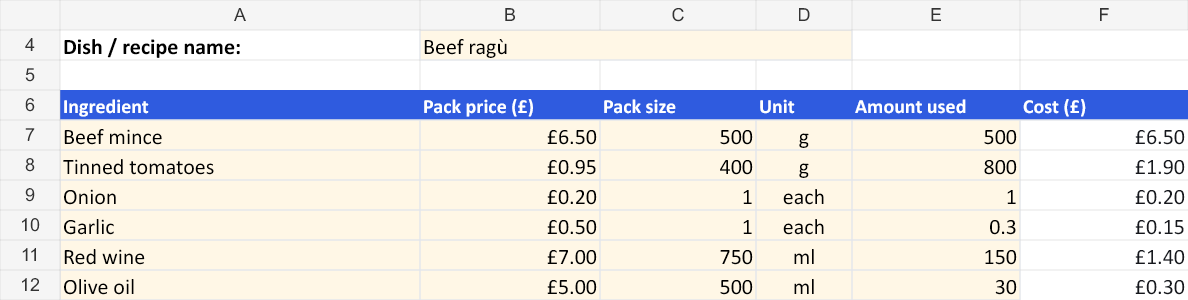
| Ingredient | Pack | Used | Cost |
|---|---|---|---|
| Beef mince | £6.50 for 500 g | 500 g | £6.50 |
| Tinned tomatoes | £0.95 for 400 g | 800 g | £1.90 |
| Onion | £0.20 each | 1 | £0.20 |
| Garlic | £0.50 each | 0.3 | £0.15 |
| Red wine | £7.00 for 750 ml | 150 ml | £1.40 |
| Olive oil | £5.00 for 500 ml | 30 ml | £0.30 |
| Total, 4 portions | £10.45 |
£10.45 ÷ 4 = £2.61 a portion. At the sheet's 30% target food cost, £2.61 ÷ 0.30 = £8.71 ex-VAT (£10.45 on the menu with 20% VAT), leaving £6.10 gross profit a portion. That is the ragù only: pasta, cheese and garnish go in as more lines.
How the Menu Overview flags a dish
Type each dish's cost per portion and its ex-VAT selling price into the Menu Overview and it works out food cost %, GP % and profit per dish, then gives every row a status: Healthy at 30% food cost or under, Watch above 30% up to 38%, and Low GP above 38%. Three illustrative rows:
| Dish | Cost / portion | Price ex-VAT | Food cost | Status |
|---|---|---|---|---|
| Beef ragù | £2.61 | £9.50 | 27.5% | Healthy |
| Burger and fries | £2.99 | £9.00 | 33.2% | Watch |
| Sirloin steak | £9.20 | £22.00 | 41.8% | Low GP |
Sort a real menu like that and the question changes from "are we making money?" to "what do we do about the steak?": reprice it, re-portion it, change the garnish, or keep it as a draw and accept the margin. Most UK kitchens aim for 30–35% food cost across the menu, a GP of 65–70% ex-VAT (UK benchmarks). A mix of Healthy and Watch rows is normal; the Low GP rows are the ones to look at first.
How to use it
- Open the Dish Cost tab and type over the ragù: one row per ingredient with pack price, pack size, unit and amount used. Keep pack size and amount in the same unit (g with g, ml with ml).
- Set the portions the recipe yields and your target food cost %. The suggested menu price ex-VAT and the GP per portion appear.
- Optionally enter your own selling price to see food cost %, GP % and profit per portion at that price.
- Copy the Dish Cost tab for the next dish (right-click the tab, then Move or Copy, then Create a copy).
- List every dish on the Menu Overview with its cost per portion and ex-VAT price, and read the status column.
What it does not do
It is food cost only: labour, rent, packaging and VAT come on top, which is why the food cost % matters. Each dish sheet holds its own ingredient prices, so when a supplier price changes you update it on every dish that uses that ingredient; the supplier price guide shows how to find them. It is not a stock system: for actual food cost from a count, use the free stock take template.
Questions people ask
Is this a subscription?
No. It is a one-off £11.99 with no VAT charged, an instant download that is yours to keep. It is also sold on the PrepSheet Etsy shop.
Does it work in Google Sheets?
Yes. Upload the .xlsx to Google Drive and open it with Google Sheets; the formulas carry over. It also opens in Apple Numbers.
How is it different from the free recipe costing template?
The free template costs one dish on one sheet. This one adds a Start Here guide, a Dish Cost sheet built to be copied per dish, and the Menu Overview that puts up to 20 dishes side by side with a status for each.
Can I change the 30% target?
Yes. The target food cost % on each Dish Cost sheet is a cell you type into. The Menu Overview thresholds (30% and 38%) sit in its formulas and can be edited.
Is there a free food cost program I can try first?
Yes: the free food cost calculator runs in your browser with no sign-up, and the free recipe costing template is a direct download. This template is for when you want the whole menu in one file.
Goes well with
Try the numbers first, free: the food cost & GP calculator and the recipe costing tool run in your browser.